Agentic Project Management (APM)
A structured approach to building complex projects with AI Agents.
APM is an open-source framework for managing ambitious software projects with AI assistants - Claude Code, Cursor, GitHub Copilot, Antigravity, OpenCode, and Codex. Instead of working in a single, increasingly chaotic chat, APM structures your work into a coordinated system where different AI Agents handle planning, coordination, and execution as a team.
The Problem: Context Decay
Building complex projects with AI assistants hits a fundamental wall: context window limits.
As conversations grow, context degrades. The AI loses track of requirements and constraints, produces inconsistent code, and hallucinates details. Earlier parts of the conversation get compressed or discarded. For substantial projects, this makes sustained progress nearly impossible.
The Solution: Structured Multi-Agent Coordination
APM treats the AI not as a single continuous assistant, but as a team of specialized Agents. Each is focused on a specific role with intentionally scoped context.
-
Specialization - Different Agents handle planning, coordination, and implementation. Each operates in its own context with only the information it needs.
-
Persistence - Project state lives in structured documents outside Agent contexts.
- Planning documents define all work
- Memory tracks progression
- A file-based Message Bus enables cross-Agent communication
-
Continuity - When an Agent's context fills, a Handoff transfers working knowledge to a fresh instance. After completion, APM sessions can be archived for future reference
This mirrors how human teams collaborate: specialized roles, shared documentation, and explicit communication protocols.
What distinguishes this from subagent-based approaches: the agents doing implementation work are not restarted fresh on each task. They accumulate working context across assignments - building familiarity with their domain as the project progresses. When context fills, a structured Handoff transfers that working knowledge to a fresh instance rather than discarding it.
Agent Types
APM coordinates three specialized Agent types:
-
Planner - Runs once at project start. Conducts structured discovery to gather requirements and constraints, then decomposes everything into three planning documents: Spec, Plan, and Rules. Acts as the project architect.
-
Manager - Receives planning documents from the Planner and coordinates execution. Assigns Tasks to Workers, reviews completed work, manages dependencies, and maintains the big picture.
-
Workers - Execute specific Tasks within defined domains (frontend, backend, API, etc.). Workers operate with tightly scoped context - they see their current Task and accumulated working context, not the full project scope.
Each role is covered in depth in Agent Types.
Project State
Structured files outside any Agent's context keep track of state and history, so nothing is lost when a chat ends or an Agent reaches its limits.
-
Planning Documents - Three documents created by the Planner that guide all subsequent work: the Spec (what to build), the Plan (how work is organized), and the Rules (how work is performed).
-
Memory - A file hierarchy that tracks project progression. Workers log their completed work; the Manager reads those logs to track progress without reviewing code directly. Durable observations accumulate across the project.
-
Message Bus - File-based message passing between Agent conversations. The Manager writes Task assignments; Workers write completion reports. You deliver messages by running simple commands, keeping APM platform-agnostic and every interaction auditable, so you may review each Task assignment before it reaches a Worker and each result before the Manager acts on it.
-
Handoff - When an Agent's context window fills up, you transfer its working knowledge to a fresh instance. The outgoing Agent captures what it knows in structured artifacts; the incoming Agent reads them and picks up where the previous left off.
Workflow
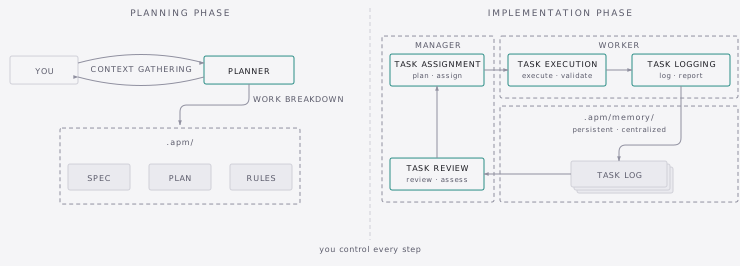
APM operates in two distinct phases:
-
Planning Phase - The Planner runs two procedures back to back:
- Context Gathering - The Planner asks you structured questions across three rounds to understand your project's vision, technical requirements, and implementation approach. After each round it iterates on gaps, and once all rounds are complete it presents an Understanding Summary for your approval.
- Work Breakdown - The Planner decomposes everything it gathered into three planning documents: the Spec, the Plan, and the Rules. You review and approve each one before the Planner moves on.
-
Implementation Phase - The Manager and Workers execute the planning documents through repeating cycles:
- Task Assignment - The Manager assesses which Tasks are ready, constructs a self-contained Task Prompt with all the context a Worker needs, and delivers it via the Message Bus.
- Task Execution - The Worker receives the assignment, executes the work, and validates results against the criteria specified in the prompt.
- Task Logging - The Worker documents the outcome in a structured Task Log and writes a brief report back to the Manager via the Message Bus.
- Task Review - The Manager reviews the log and report, then decides the next step.
The cycle repeats until all Tasks complete. The Manager can dispatch Tasks in parallel when dependencies allow, or batch sequential Tasks to the same Worker.
When an APM session completes (or at any point during one) you can archive it and start fresh. Archives live in .apm/archives/ and are accessible to future Planners during Context Gathering, so subsequent APM sessions build on what came before rather than starting from zero.
Installation & Usage
APM is installed via the agentic-pm CLI, which scaffolds commands, guides, and skills into your project workspace.
To get started, see Getting Started.
If you want your AI assistant to explain APM concepts or help with migration from an older version, the apm-assist skill can be installed into any project and answers questions by reading the live documentation.
Contributing
APM is open source and welcomes contributions. Report bugs or request features via GitHub Issues, or submit improvements via Pull Requests.
For contribution guidelines, see CONTRIBUTING.md.
Recommended Reading Order
Start using APM - Getting Started walks you through installation and your first session end to end. There's also a Quick Reference with all the commands and workflows in one place if you want it handy.
Understand the architecture - Three docs build on each other: Agent Types covers the three roles, Agent Orchestration covers how they coordinate, and Workflow Overview walks through every procedure.
Go deeper - Prompt Engineering explains how APM's files are designed. Context Engineering explains why each Agent sees what it sees.
Look things up - CLI Guide for commands and options, Troubleshooting for common issues, Tips and Tricks for model selection and workflow efficiency.