Workflow Overview
This doc walks through every procedure in both phases of an APM session, covering what happens and in what order. It builds on two preceding docs: Agent Types covers each Agent's role and responsibilities, and Agent Orchestration covers the coordination mechanisms (planning documents, the Message Bus, Task Prompt construction, Memory, and Handoff). Where this doc touches on those topics, it references back rather than repeating them.
Planning Phase
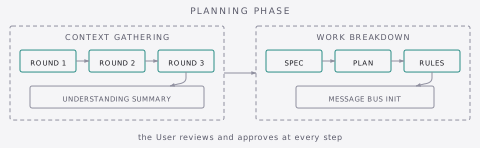
The Planning Phase produces the planning documents that guide all subsequent work. The Planner runs once at project start through two sequential procedures: Context Gathering, then Work Breakdown.
Context Gathering
The Planner conducts structured discovery through three progressive question rounds, each building on the previous. The goal is to gather enough context to create accurate planning documents without interrogating exhaustively.
Before starting question rounds, the Planner performs workspace discovery during its initiation: scanning the directory structure, detecting git repositories (commit history, branch structure as project signals), locating existing materials, and reading the platform's rules file if present. Materials referenced by the User's initiation context are treated as authoritative; discovered materials without that context are presented for User confirmation before deep exploration. If .apm/archives/ exists, archived sessions are presented and, when relevant, examined via the apm-archive-explorer subagent with findings verified against the current codebase before integration.
Once workspace discovery is complete, the Planner begins question rounds. Relevant codebases are explored in depth before entering questions so that the Planner's questions are grounded in actual project understanding rather than surface-level scanning.
Round 1 - Existing Materials and Vision. Project type, problem and purpose, essential features and scope, existing documentation and materials, current plan or vision, previous work and codebase context.
Round 2 - Technical Requirements. Design decisions and constraints, work structure and dependencies, technical and resource requirements, complexity and risk assessment, validation criteria.
Round 3 - Implementation Approach and Quality. Technical constraints and preferences, workflow patterns and quality standards, coordination and approval requirements, domain organization, finalizing design decisions.
After each round, the Planner assesses gaps and follows up before advancing. When User responses reference codebase elements, the Planner explores proactively - using subagents for substantial research to preserve its own context for Work Breakdown. After subagent results return, the Planner verifies critical claims by reading referenced files directly, since subagent summaries can compress or misrepresent details that matter for planning. Each round ends with a completion summary covering what was gathered and why the round is ready to advance.
After all three rounds, the Planner presents a consolidated Understanding Summary for User review. The User verifies that the Planner accurately understands the project before planning documents are created. Modifications loop through targeted follow-ups until the User approves.
Work Breakdown
The Planner decomposes gathered context into three planning documents through visible reasoning, presenting its thinking in chat before writing to files. This makes decomposition decisions visible and allows the User to redirect before artifacts are committed.
Spec. The Planner analyzes design decisions from gathered context and writes the Spec, including a Workspace section that maps the project environment (directory structure, repositories, authoritative documents). The User reviews and approves before the Planner moves on.
Plan. The Planner identifies work domains and maps them to Workers. It reasons about how domain characteristics create stage boundaries, then walks through each Stage's deliverables and how they decompose into Tasks before deepening the analysis per Task. After a dependency analysis and pre-write completeness checks, the Planner writes the full Plan and presents it for User review and approval.
Rules. The Planner extracts universal execution patterns and writes them to the platform's rules file (e.g. CLAUDE.md, AGENTS.md, AGENTS.md). The User reviews and approves.
After all three documents are approved, the Planner initializes the Message Bus. The Planning Phase is complete. The User opens a new conversation and initiates the Manager.
Implementation Phase
The Implementation Phase executes the planning documents. The Manager coordinates, Workers execute Tasks, and the cycle repeats until all Stages complete.
First Manager Initialization
The first Manager instance (Manager 1) reads all planning documents and its procedural guides, then:
- Explores the workspace's git state for each working repository: current branch, available branches, recent commit history, and existing patterns. If
.apm/is inside a repository, adds.apm/to.gitignoreby default and asks whether the User wants to track any.apm/artifacts in git. - Presents an Understanding Summary alongside proposed version control conventions for User approval. The summary covers project scope, key design decisions, Workers, Stage structure.
- On approval, populates the Tracker with Stage 1 Tasks, all Worker assignments, and version control state, and initializes the Memory Index.
The User reviews and authorizes the Manager to proceed. It then assesses which Tasks are ready and begins dispatching work.
Task Cycles
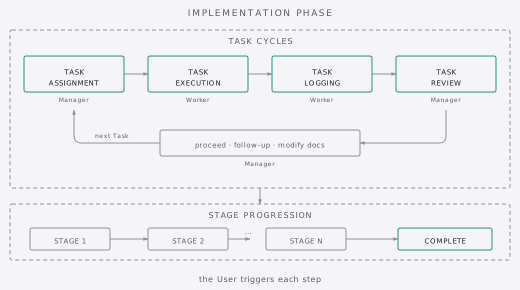
Each Task progresses through four procedures: Task Assignment, Task Execution, Task Logging, and Task Review. This cycle repeats for every Task in the project.
Task Assignment
The Manager assesses which Tasks are ready based on dependency completion and the Tracker, then determines the dispatch mode - single, batch, or parallel.
For each Task, the Manager constructs a self-contained Task Prompt and writes it to the Worker's Task Bus, directing the User to the Worker's conversation.
For uninitialized Workers, the Manager directs the User to create a new conversation and run the initiation command with the Worker's identifier - the Worker detects the pending Task Prompt during initialization and begins executing. For batch dispatch, it summarizes what the Worker will receive. For parallel dispatch, it lists each Worker with its required action.
Task Execution
The Worker receives the Task Prompt - either detected during initialization or delivered via /apm-4-check-tasks for subsequent Tasks - and begins execution:
- Context integration - If dependencies on other Agents' work exist, the Worker reads the specified files to integrate prior work before starting.
- Execution - The Worker follows the instructions step by step, applying Rules from the platform's rules file throughout.
- Validation - The Worker validates results against the criteria in the prompt, completing autonomous checks before involving the User. If criteria require User involvement (judgment or action), the Worker pauses only after autonomous checks pass.
- Iteration - If validation fails, the Worker investigates the root cause before attempting a fix: reading error output, tracing the failure, understanding what went wrong. One targeted change per iteration. If the fix does not resolve the issue, the Worker spawns a debug subagent with structured instructions (error output, what was investigated, expected vs actual behavior) to trace the root cause and propose a fix in a fresh context. The Worker validates the subagent's findings before applying them. If unresolved, the Worker reports back with Partial status rather than exhausting its context window.
When the User provides a correction or directive during execution, the Worker complies immediately and continues. At Task completion, the correction is noted in the Task Log as an important finding for the Manager. The Worker then asks whether the correction should become a Rule for all Workers, but only after logging and reporting so it does not block the workflow.
Task Logging
Once execution is complete, the Worker writes a structured Task Log to Memory documenting:
- Outcome status (Success, Partial, or Failed)
- Validation results
- Deliverables and file changes
- Flags for Manager attention (important findings, compatibility issues)
The Worker then writes a brief Task Report to its Report Bus summarizing status and key findings, and directs the User to deliver the report to the Manager.
For batch execution, the Worker logs each Task immediately after completing it and only writes a consolidated batch report after all Tasks are done (or after stopping on failure).
Task Review
The Manager receives the report via /apm-5-check-reports and reviews the outcome:
- Report processing - The Manager reads the Task Report and checks for Handoff or recovery indications. For batch reports, each Task's outcome is processed individually. If a report arrives from a non-APM agent, the Manager can incorporate its contributions or assign follow-up work.
- Log review - The Manager reads the Task Log, interprets status and flags, and assesses whether the claimed status is consistent with the log content. Inconsistency between claimed status and actual content is a hallucination indicator.
- Review outcome - If everything looks good (Success, no flags, content supports the status), the Manager proceeds. If something needs attention, the Manager investigates - self-investigating for small-scope issues, spawning a subagent for larger ones. Three outcomes are possible:
- Proceed - No issues found. Update the Tracker, dispatch any newly ready Tasks.
- Follow-up - Worker must retry. The Manager creates a new Task Prompt with refined instructions based on what went wrong. Same log path; the Worker overwrites the previous log.
- Document modification - Execution revealed issues with the Spec, Plan, or Rules. The Manager assesses cascade implications and determines whether modifications fall within its authority or require User collaboration. After modifications, the Manager proceeds or issues a follow-up.
- Tracker update - Every outcome path ends with updating the Tracker.
After each review, the Manager immediately reassesses readiness and dispatches the next Task in the same turn when one is ready. Review and dispatch happen continuously without waiting for User input. The Manager pauses only when no Tasks are ready and Workers are active (wait state), or when a decision requires User collaboration.
Stage Progression
Stages are sequential. Stage N+1 begins after Stage N completes. Parallel work across domains happens through parallel Task dispatch within a single Stage, not cross-Stage execution.
After all Tasks in a Stage are Done, the Manager assesses whether the Stage's deliverables require holistic verification before proceeding. This decision is based on complexity and observations from Task Reviews. When verification is needed, it runs checks, examines edge cases, or dispatches a verification subagent. It then writes a Stage summary to the Index with Stage-level outcomes and durable observations, and proceeds to the next Stage's first dispatch.
Project Completion
After all Stages complete, the Manager marks the project as complete in the Tracker and presents a project completion summary covering: Stages completed, total Tasks executed, Workers involved, Stage outcomes, notable findings, and final deliverables.
The Manager then guides the User through optional next steps. Running /apm-8-summarize-session in a new conversation produces a structured session summary covering decisions made, work completed, and lessons learned - this helps future Planners absorb archived context more efficiently. Alternatively, the User can run it in the completing Manager's chat when context allows. The Manager's accumulated project knowledge can produce a more detailed summary with fewer gaps. Running apm archive via the CLI archives the current .apm/ artifacts and cleans the workspace for a new session. The summarization agent also offers to perform archival at the end of its procedure.
Handoff
When an Agent's context window approaches its limits, a Handoff transfers working knowledge to a fresh instance. The mechanics of Handoff - the two-artifact system, context reconstruction, and how it affects dependency context - are covered in Agent Orchestration. This section describes how Handoff fits into the workflow.
Handoff can happen at any point during the Implementation Phase. The Manager or Worker signals context pressure, or the User notices signs of degradation (repeating questions, forgetting constraints, reduced quality). The User triggers the Handoff by running /apm-6-handoff-manager or /apm-7-handoff-worker. The outgoing Agent creates its artifacts, the User opens a new conversation for the same role, and the incoming Agent auto-detects the Handoff Prompt during initialization.
If auto-compaction happens instead and the Agent starts acting inconsistently, the User runs /apm-9-recover to reconstruct working context without a full Handoff.
Session Continuation
When an APM session ends, whether through project completion, a decision to pause, or a shift in direction, the User can archive the session and start fresh.
- Summarize - The User runs
/apm-8-summarize-sessionin a new conversation. The summarization Agent reads.apm/artifacts, validates them against the current codebase, and produces a session summary. - Archive - The User runs
apm archive(orapm archive --name custom-name). This snapshots.apm/artifacts to.apm/archives/, removes installed assistant files, and clears installation metadata. - Continue - The User runs
apm initto start a new APM session with fresh templates. The new Planner detects existing archives during Context Gathering and asks about their relevance - so each APM session can build on what came before.
Next Steps
- Prompt Engineering - How APM's files are designed and structured
- Context Engineering - How APM manages what each Agent sees and why
- CLI Guide - All CLI commands and options
- Troubleshooting Guide - Common issues and recovery procedures
- Tips and Tricks - Model selection, cost optimization, and workflow efficiency
- Customization Guide - Custom repositories and template customization