3 APM Design
3.1 Design Goals
APM is a framework operating on top of a coding agent. It uses several such agents to form a MAS intended for substantial, real-world software development projects. Its design limits context accumulation by dividing a project across separate agent conversations and giving each agent a distinct responsibility: one plans the project, one distributes the work and reviews what comes back, and the rest carry it out.
Partitioning responsibilities across conversations, however, also separates the knowledge and decisions that keep the agents’ contributions consistent with what they should collectively produce. To address this separation, APM uses shared files to make that information persistent and available throughout the project. They hold project intent, execution state, and information exchanged among agents, while explicit protocols define what each agent reads and writes.
Beyond coordinating its agents, APM aims to preserve user authority over development and agent interaction. The user holds final authority over project decisions, while workflow review points keep planning, coordination, and execution visible and open to intervention. Unlike standard coding agents that delegate to subagents autonomously within a single conversation, APM places the user directly at the communication boundary between agents, requiring human mediation for their exchanges. Prior work in human–computer and human–AI interaction has explored how deliberately placed pauses can invite reflection [39], [40].
3.2 Workflow Overview
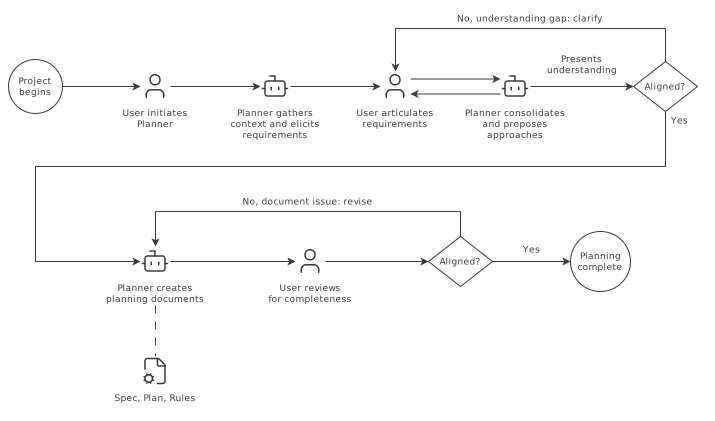
APM realises these goals through a development workflow of two phases: a planning phase and an implementation phase. Planning begins with an agent exploring the project and questioning the user until they share an understanding of what the project requires. The agent records that understanding in documents that define the intended result, break down its implementation into parts, and set the rules for carrying it out.
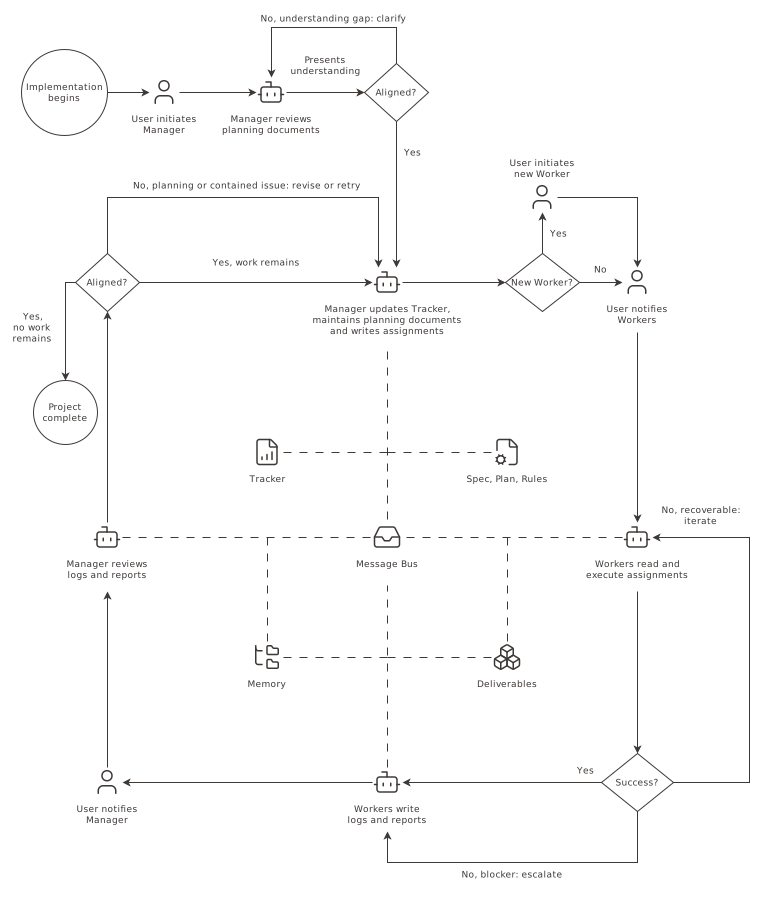
Implementation begins when a coordinating agent, acting much like a job scheduler, reads those documents and prepares work assignments for other agents. Each of those agents executes and validates its work, records the outcome, and reports back for review. Based on its review, the coordinating agent decides the next action and continues until the project is complete. Across this cycle, every exchange between the separate conversations passes through the user, who can review the work behind it and intervene at any point with direction or correction. Shared files hold assignments, reports, project state, and history.
Sections 3.3 and 3.4 define the roles and describe how user-mediated coordination takes place, while Sections 3.5 and 3.6 explain how APM preserves state and manages the project.
3.3 Agent Roles
APM organises its agents into three roles: the Planner, Manager, and Worker. Figures 3.1 and 3.2 place them in the workflow, while Table 3.1 summarises their properties. Each is a coding agent operating in its own conversation under role-specific instructions. Those instructions define the agent’s responsibilities, workflow, and protocols, which determine the project information its conversation needs to hold. Planning involves one Planner, while implementation involves one Manager at a time and one or more Workers. Each retains the coding agent’s ordinary tools and access permissions. Their specialisation comes from scoping the context that reaches them.
The Planner does research, resolves requirements and design choices with the user, and records the result in three planning documents. The Spec defines what to build. The Plan divides implementation into bounded units of work organised by domain. The Rules govern how their execution is carried out. The Planner’s participation ends when implementation begins, leaving its conversation’s full context window available to develop these documents.
The Manager coordinates implementation at project level. It distributes assignments to Workers and supplies the context required to execute them. It reviews their results, which form its context together with the planning documents and project state it maintains. The instructions the Manager receives establish its usual focus, while review or investigation may take it into code or execution detail.
Each Worker receives the assignments of one domain from the Plan, then executes and validates them. Workers follow the Rules. As context accumulates across successive assignments, they build familiarity with their respective part of the project.
When investigation or debugging threatens to consume a conversation’s context, the agent launches platform-native subagents. Their findings return to the role’s conversation for verification and integration.
| Role | Phase | Concurrent conversations | Context scope |
|---|---|---|---|
| Planner | Planning | One | Project definition and decomposition |
| Manager | Implementation | One | Project-level coordination |
| Worker | Implementation | One or more | Execution within one domain |
3.4 Agent Coordination
The Planner produces its three planning documents through iteration with the user. Its accumulated context does not pass into implementation: the Manager receives the finished Spec, Plan, and Rules, whereas Workers receive only the Rules. Withholding the Spec and Plan protects execution context windows from project-wide details that are irrelevant to a single assignment.
A Task is a bounded unit of work from the Plan assigned to one Worker. A Task Prompt carries the information that the Worker needs to execute it. The Manager draws planned requirements from the Spec and Plan and adds context from related contributions. Familiarity determines the detail: a pointer may recall a Worker’s own output, an upstream contribution specifies what was produced and how the Task depends on it, and downstream context indicates how future work will consume the result. After carrying out the work, the Worker returns a Task Report, which records the outcome.
The user creates each Worker by opening a new conversation for its first Task, and later Tasks reuse that conversation. As prerequisites complete and unblock downstream work, the Manager dispatches ready Tasks: individually, in sequential batches to a single Worker, or concurrently across separate domains.
These exchanges between conversations are carried through a file-based Message Bus. Each Worker has a Task Bus, where the Manager writes its Task Prompts, and a Report Bus, where the Worker writes its Task Reports. Figure 3.2 places this exchange in the implementation phase loop, while Figure 3.3 maps its two directions. A bus file is empty or holds one message awaiting delivery. Its recipient clears the file after processing that message, before the channel is reused. The user serves as the mediator between the separate conversations: when an agent writes to a bus file, it informs the user, who directs the recipient to read it.
These friction points are deliberate. They let the user exercise authority as decisions and results pass between agents. Before passing a message on, the user can review the work in any way they choose, such as reading the changes or running tests. They can ask its sender to correct the work and update the message, or raise the issue with its recipient. Mistakes or unwanted directions can thus be addressed before they propagate through the project.
The user can also shape how often these points occur. At any time, they can ask for smaller or larger Tasks, and for Tasks to be dispatched one at a time or in batches. Smaller Tasks sent one at a time give more chances to review, each covering less work. Larger Tasks and batches speed up implementation but give fewer, each covering more.
Under this file-based exchange, running turns involve only the Worker and the user, while the Manager remains idle until the user delivers the Task Report. An agent that encounters blocking issues or failing validation reports incomplete or failed progress for the Manager to review. If an agent hangs or strays during execution, the user can interrupt its conversation directly to stop it.


3.5 State Management
The planning documents define the intended work, but execution may reveal that they need to change. The Manager can revise them within the project’s established direction, while Workers may propose changes to the Rules. Changes to project scope, however, require explicit user direction and approval.
During implementation, the Manager also maintains documents for coordination and project history. The Tracker is its live record of where the work stands, holding the status of every Task, the Worker on each one, and the version control state and conventions in force. Working notes accumulate in it, carrying pending considerations and findings that may affect later decisions. Memory is a hierarchically organised collection of files that preserves project history. Its Index provides the overview: summaries of completed work with references to their underlying records, and durable observations distilled from the Tracker’s working notes, including established patterns, preferences, and project-level insights. Figure 3.2 shows these documents in the implementation phase loop.
After executing a Task, its Worker writes a Task Log that reduces accumulated execution detail to what the Manager needs for coordination: the outcome, validation results, deliverables, file changes, and findings bearing on the wider project. The Task Report points to this log for review. Condensing execution and coordination detail lets the Manager oversee several Workers, dispatch and review many Tasks, and maintain APM’s project state without its own context growing in proportion. Figure 3.4 summarises how both enter Memory.


To address context pressure and decay in implementation-phase agents, the user invokes a Handoff on demand, transferring the role from the conversation holding the accumulated context to a fresh one. The outgoing agent follows the framework’s instructions to record what must carry over in two documents. The Handoff Log records past work, decisions, and working knowledge not held in Task Logs, and joins them in Memory. The Handoff Prompt describes the current state and tells the incoming agent what to read and do next. The user carries it through the role’s Handoff Bus. The incoming agent rereads its role instructions, then uses both documents and relevant project files to resume from where the outgoing agent left off. Figure 3.5 traces the transfer.


The context window limit is the usual occasion for a Handoff to occur, but the user can invoke one earlier to reduce cost or try to restore performance. The system hosting the agent can also reset accumulated context through compaction, described in Section 2.2, but the resulting summary is ephemeral to the conversation. If the conversation fills again, the next compaction condenses it together with the context accumulated since, further reducing the detail retained from earlier work. A Handoff instead records the transfer in persistent files, so successive Handoffs retain a durable history of the role’s work.
When an agent loses its working state without having performed a Handoff, the user can invoke APM’s recovery procedure. The agent then rereads its role instructions and relevant project files to restore the framework’s procedures and establish where its work stands.
3.6 Project Management
APM operates through structured documents and commands. Its artifacts use Markdown, often paired with YAML fields that identify state and determine procedural branches. APM packages each command as a pre-written prompt and adapts its invocation syntax to each coding-agent platform it supports. Table 3.2 lists the commands in the slash-prefixed form common to those platforms. The user invokes each command in the appropriate conversation.
| Command | Addressed agent | Function |
|---|---|---|
/apm-1-initiate-planner | Planner | Initiate a Planner conversation |
/apm-2-initiate-manager | Manager | Initiate a Manager conversation |
/apm-3-initiate-worker | Worker | Initiate a Worker conversation |
/apm-4-check-tasks | Worker | Deliver a Task Prompt to the Worker |
/apm-5-check-reports | Manager | Deliver Task Reports to the Manager |
/apm-6-handoff-manager | Manager | Initiate a Manager Handoff |
/apm-7-handoff-worker | Worker | Initiate a Worker Handoff |
/apm-8-summarize-session | Standalone agent | Summarise the project and optionally archive its state |
/apm-9-recover | Manager or Worker | Reconstruct the role’s working context |
Each command establishes a role and points the agent to the procedures its next step requires. Detailed procedures live in separate guides, each addressed to a single role, which the agent reads when it reaches the step that needs one. Instructions shared across roles, such as the Message Bus protocols, are packaged as Agent Skills [41].
3.6.1 Planning Phase
Planning begins with the Planner building an understanding of the project. It reads the materials the user identifies as authoritative and explores any codebase the project involves before questioning the user, so its questions address what remains unknown. The Planner may delegate substantial codebase research to subagents, then verifies their findings before using them in its questions or planning documents. Successive rounds go deeper, covering the project’s purpose and deliverables, then its technical requirements and dependencies, then the constraints, standards, and conventions under which the work should be carried out. Where research or the user’s answers open more than one viable approach, the Planner presents the alternatives with their trade-offs and the user chooses.
The questioning ends with a consolidated account of the Planner’s understanding, and planning advances only once the user approves it. Corrections send the Planner back to the material: it applies what the user raised, asks whatever the correction opens up, and presents the revised account again.
The Planner then produces the Spec, the Plan, and the Rules, one at a time. It presents its reasoning for each in the conversation before writing it, and each document passes through that same review cycle before the next begins. Written against each other in turn, the three hold one account of the project.
The Spec records the decisions that shape what is built: the choice made, the alternatives it displaced, and the constraints that bound it. Its structure follows the project’s concerns, and where the user’s documents already define a requirement it references them instead of restating it. Decisions are kept separable so the Manager can extract the ones a given Task needs.
The Plan organises the work. It partitions the project into cohesive domains, separating areas requiring distinct expertise or mental models, and combining those sharing tight context and dependencies. Each domain gets its own Worker. For every Task, it defines the deliverables, the validation criteria, and the Tasks it depends on. A Stage is a group of related Tasks that delivers a coherent part of the project and begins only after the preceding Stage completes. Within a Stage, a Task waits for the ones it depends on, while those whose dependencies are complete can proceed together. Parallel work therefore happens only within a Stage, as Figure 3.6 shows.


The Rules hold the execution patterns that apply across all or most Tasks, such as coding conventions and quality standards. Every Worker receives the same Rules, yet a requirement is not a Rule merely because it reaches every Worker: an output format or interface contract belongs to the Spec.
3.6.2 Implementation Phase
Implementation begins with the Manager reading the planning documents and presenting its understanding of the project and the conventions it will work under. It dispatches the first Task once the user approves.
A Task is ready when the Tasks it depends on are complete. Its Worker works from the Task Prompt, the Rules, whatever it needs from the project’s files, and the context it has accumulated over earlier Tasks. It executes the work and validates it against the Task’s criteria, iterating where validation fails and pausing for the user where a criterion needs the user’s judgement or an action outside the development environment. A difficult failure may be delegated to a debugging subagent, whose findings the Worker verifies before applying them. It then reports the outcome it reached: the Task complete, partial progress where iteration stalled, or a failure.
The Manager reviews the Task Report and the Task Log. An outcome short of complete, or a Worker’s note that execution touched something beyond its Task, prompts investigation before anything is accepted. The Manager handles contained checks directly and may delegate context-intensive investigation to a subagent. The findings of this review decide among three outcomes. The work stands as it is, the Worker retries under a refined Task Prompt, or the planning documents need updating, as Section 3.5 describes. In each case the Manager records the result in the Tracker and reassesses which Tasks have become ready. Figure 3.7 follows one Task through this cycle.
The Manager uses version control to keep each dispatched Task’s work separate. At the start it establishes with the user which repositories the work targets and what branch and commit conventions each follows. Work for a dispatched Task goes on its own branch off the agreed base of the repository it touches, and concurrent Workers each get an isolated working copy of it through a git worktree. Workers commit their own work, while merging belongs to the Manager alone. This way work lands on the base branch only after passing the user who mediated its report and the Manager who reviewed and accepted it.


When every Task of a Stage is complete, the Manager closes it by writing a summary into Memory’s Index and distilling the working notes the Stage accumulated. Those with lasting value join the Index as durable observations. Notes needed by the next Stage stay in the Tracker, and the rest are cleared. The Manager then opens the next Stage. When no Stage remains, the Manager records the project as complete and presents an account of what was built.
At project completion or any point requested by the user, APM can archive all files that hold project state and optionally add a document summarising their scope, outcomes, decisions, deliverables, and issues. A later Planner can use APM’s custom archive-research subagent to inspect a relevant archive and inform project research and planning.
3.7 Distribution and Customisation
APM keeps a single platform-neutral source of commands, guides, skills, subagent definitions, and project artifacts as templates in its GitHub repository. Coding-agent platforms differ in where and how they accept these documents. During a release build, the build system inserts each platform’s unique paths, formats, and syntax into the templates, and the resulting packages are published in a GitHub Release with a manifest identifying which package belongs to each supported platform [5].
A command-line tool, agentic-pm, provides the user interface to this distribution. It is released separately through npm [42]. The user selects a platform; the tool fetches a compatible release, resolves the corresponding package from its manifest, and scaffolds it into the project’s workspace. It records the source and release for later updates. The tool and templates follow independent semantic versioning, with only the major version shared for compatibility.
The same architecture also makes the workflow customisable. Within their own copy or fork of the repository, users can extend or adapt any part of the framework’s workflow, protocols, and procedures. The build system turns that custom source into platform packages and a release manifest that users can publish as their own GitHub Release. Through its custom-repository interface, the command-line tool fetches and scaffolds these releases in the same way as the official distribution.
Two official variants demonstrate this extension surface. APM Auto [43] replaces the original workflow’s separate, user-mediated Worker conversations with Worker subagents launched directly by the Manager. APM Semi [44] retains the original workflow but gives the user more control by letting them claim any Task to complete themselves, with the Manager or assigned Worker standing by for assistance and validation.